Compress PDFs Offline on Ubuntu with PDFGraph
Published · Updated · By CatalystCodeTo compress a PDF offline on Ubuntu, start with lossless optimization. If a scan or photo-heavy document is still too large, try image downsampling and check that the smallest text remains readable. PDFGraph provides both options through a free Rust command-line tool that runs QPDF and Ghostscript locally. Your PDF stays on your machine during compression.
Already installed? Run pdfgraph report.pdf to create report.compressed.pdf using the default lossless mode. For scans, try --mode balanced at 150 DPI. Keep the original and inspect the output before sharing it.
Version covered: PDFGraph 0.1.0. CLI behavior and installation steps were reviewed against the published source. Use the checks below to measure the result on your own document.
Quick start: compress one PDF
After installation, choose the command that fits your document:
# Text reports and diagrams: preserve image resolution
pdfgraph report.pdf -o report-lossless.pdf

# Scans and photographs: try a 150 DPI image candidate
pdfgraph scan.pdf --mode balanced -o scan-balanced.pdf

# A lower-resolution candidate: inspect small text carefully
pdfgraph scan.pdf --mode small -o scan-small.pdf
Run each command from the directory containing the PDF, or provide its full path. Each output filename must be different from the input, and an existing output is protected by default.
What is PDFGraph?
PDFGraph is a CatalystCode open-source project for compressing one PDF per command. The Rust wrapper is MIT licensed. It coordinates a lossless QPDF pass and, when requested, a Ghostscript image pass, validates the candidates, and saves the smallest valid result. The engines are separate system packages with their own licenses.
It has no upload step, account, API key, or telemetry. Version 0.1.0 focuses on compression; it does not provide merging, splitting, OCR, or format conversion.
Install PDFGraph on Ubuntu
You need Rust 1.74 or later with Cargo, a native linker, Git, and QPDF. Ghostscript is required for image modes. Install Rust through the official Rust installation instructions, then run these commands in an Ubuntu terminal:
sudo apt update
sudo apt install build-essential git qpdf ghostscript

git clone https://github.com/catalystcode-dev/PDFGraph.git
cd PDFGraph
# Build the exact source revision covered by this guide
git checkout --detach 8f10ebdcacf74433269a43459e25e9cbfeb01503
cargo build --release --locked --offline
sudo install -m 755 target/release/pdfgraph /usr/local/bin/pdfgraph

pdfgraph --version
pdfgraph --help
The checkout pins the examples to a reviewed revision. QPDF 10.6 or later and Ghostscript 9.55 or later are the engine minimums declared by the packaging script. Check your installed versions with qpdf --version and gs --version. You can omit Ghostscript if you only use lossless mode.
Initial setup can require downloads. The --offline build flag prevents Cargo from accessing the network; this revision has no external Rust crate dependencies. The Rust toolchain and native build tools must already be installed. After setup, compression needs no internet connection.
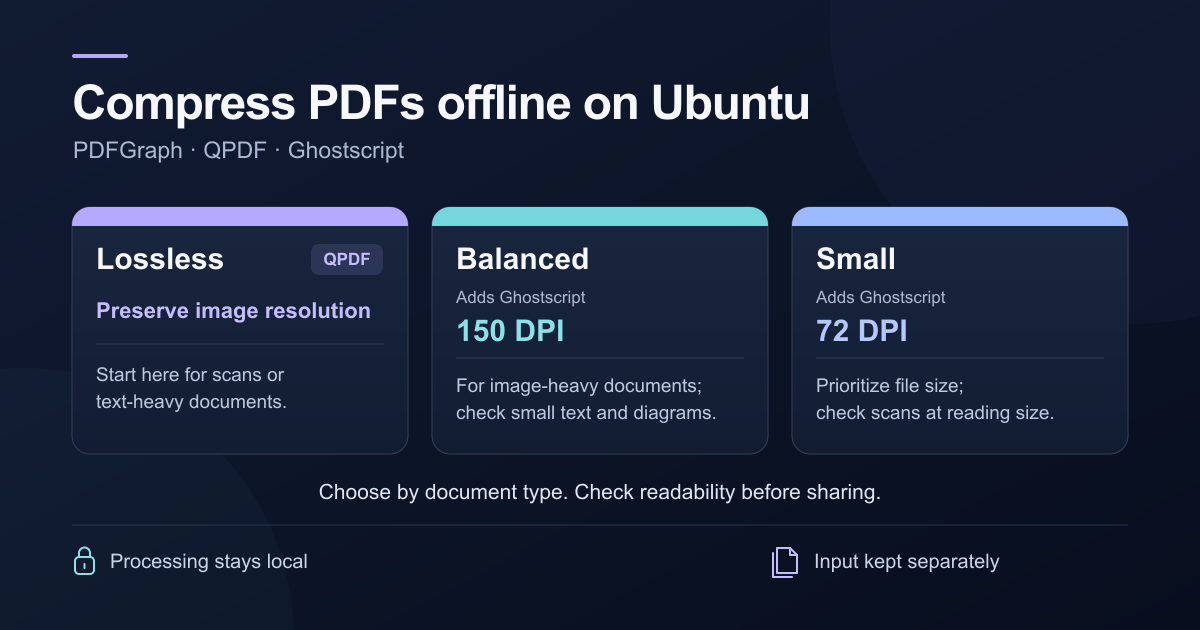
Choose lossless, balanced, or small mode
| Mode | Processing | When to try it |
|---|---|---|
lossless (default) | QPDF object and stream optimization; no image downsampling | Text, vector diagrams, or images whose detail must be preserved |
balanced | Also tries Ghostscript at 150 DPI for color/grayscale and 300 DPI for monochrome | Scans or photographs that remain too large after lossless optimization |
small | Also tries Ghostscript at 72 DPI for color/grayscale and 144 DPI for monochrome | A smaller screen-reading candidate, if fine detail can be sacrificed |
Image modes compare candidates by file size. Selecting balanced or smalldoes not guarantee that the image-processed candidate will win. Lower-resolution images are not enlarged, and engine thresholds can leave images near the target unchanged.
Compress a PDF without reducing image quality
Begin with the default lossless mode. It compresses internal streams and groups eligible objects without reducing image resolution or deliberately applying lossy image encoding:
pdfgraph report.pdfThe default output is report.compressed.pdf beside the input. To choose a filename, use -o. Quote paths that contain spaces:
pdfgraph "Monthly Report.pdf" -o "Monthly Report-smaller.pdf"Lossless describes the retained content, not identical file bytes. Rewriting a PDF can invalidate a digital signature. Keep signed originals unchanged, even when the pages look the same.
Reduce the size of a scanned PDF
Scanned pages often store a large image of each page. If lossless optimization is insufficient, try balanced, then compare it with the original at a readable zoom level:
pdfgraph scanned-report.pdf --mode balanced -o scanned-report-balanced.pdfIf fine text or handwriting loses detail, generate a new candidate from the original at a higher target, such as 200 DPI:
pdfgraph scanned-report.pdf --mode balanced --dpi 200 -o scanned-report-200dpi.pdfThe --dpi option accepts integers from 36 to 1200 and requires balancedor small mode. Monochrome images use twice the selected target. A higher DPI often retains more detail, but file size also depends on image encoding and the rest of the PDF.
Always work from the original when changing settings. Compressing an already blurry copy again cannot restore discarded pixels. Ghostscript generally retains text and vector drawing content, but its PDF writer creates a new document and can change interactive or accessibility features.
Verify the compressed output
PDFGraph validates candidates with QPDF and checks that their page counts match the input. If every compression candidate is larger, it saves the original bytes to the output. Zero percent saved is therefore a legitimate result for an already optimized document.
You can check structure, compare page counts, and read exact byte sizes on Ubuntu:
qpdf --check report.compressed.pdf
qpdf --show-npages report.pdf
qpdf --show-npages report.compressed.pdf
stat -c '%n: %s bytes' report.pdf report.compressed.pdf
Matching page counts and a successful structural check cannot confirm every visual detail or feature. Open both PDFs and inspect small text, image detail, page orientation, links, annotations, and any form fields you depend on. Check search or text selection if the document has an OCR layer.
The destination directory must exist. To deliberately replace an existing output, use --force:
pdfgraph report.pdf -o smaller.pdf --forceThe input and output must still be different files. New output files use owner-only read/write permissions (0600). If another local account needs the result, adjust sharing permissions deliberately after checking the file.
Limitations to consider before compression
- Forms, links, and annotations: Ghostscript image modes may change or discard these. Prefer lossless mode and verify the features you need.
- Digital signatures: any rewritten candidate can invalidate an existing signature. Preserve the signed file separately.
- Encrypted PDFs: PDFGraph rejects them, including encrypted files that open without a password prompt.
- Archival and accessible PDFs: PDF/A or PDF/UA conformance and accessibility tags are not guaranteed by this workflow.
- Exact upload limits: there is no target-size option. A readable PDF below 1 MB or 500 KB may be impossible for some documents.
For Ghostscript's content-preservation limits, see the Ghostscript PDF writer documentation for its treatment of content that does not draw visible marks on a page.
Troubleshoot common PDFGraph problems
| Problem | What to check |
|---|---|
pdfgraph: command not found | Confirm the install step succeeded and /usr/local/bin is on your PATH. Try /usr/local/bin/pdfgraph --help. |
| Missing QPDF or Ghostscript | Install qpdf or ghostscript with apt. Image modes require Ghostscript and fail if it is unavailable. |
| Output already exists | Choose a new filename, or use --force to replace a separate output intentionally. |
| Invalid DPI or mode | Use --mode balanced --dpi 200, for example. DPI must be 36–1200 and cannot be combined with lossless mode. |
| Cannot write output or temporary files | Check directory permissions and free disk space. The work directory is beside the destination and can hold several PDF copies. |
| No size reduction | The original may already be efficient. For scans, compare an image mode. For exported documents, consider smaller source images or different export settings. |
Why is a short PDF so large?
Page count alone says little about file size. A PDF contains the objects needed to display its pages: text, embedded fonts, images, and drawing instructions. A five-page scan can carry far more data than a long text report. Common causes include full-resolution photographs, page-sized scans, embedded attachments, and print-oriented export settings.
Selecting a sentence in your PDF reader is a useful clue: selectable text means a text layer is present. It does not prove that the pages are mostly text. A scan can have an OCR text layer over a large page image, so image compression may still offer the biggest savings.
How PDF compression works
Lossless optimization stores content more efficiently
QPDF can recompress eligible data streams and collect small internal objects into compressed object streams. This changes how the document is stored while retaining its content. It is a sensible starting point for text and vector PDFs, but already compressed streams may offer little room for improvement. Read the QPDF compression options for the engine-level controls.
Downsampling reduces pixel dimensions
DPI describes image resolution relative to its displayed size. A 300 DPI scan has more pixels than a 150 DPI scan of the same physical page. Halving both pixel dimensions leaves one quarter of the pixels; it does not guarantee one quarter of the PDF's file size. Encoding, fonts, and other document objects still contribute bytes. Small text and fine lines are often the first details to suffer when the target is too low.
Image encoding controls how those pixels are stored
An image can keep the same dimensions yet use fewer bytes through lossy encoding such as JPEG. Resolution and encoding quality are separate controls. Photographs often tolerate lossy encoding better than sharp line drawings. PDFGraph exposes a DPI target for its image modes, not a separate JPEG-quality slider.
Does offline compression keep the PDF private?
PDFGraph reads and writes local files and runs locally installed engines. It does not send your PDF to a compression service. Files in a cloud-synced folder may still be uploaded by that folder's sync software, so choose a local folder if you need to avoid synchronization.
A browser-based compressor can also process files locally. Check where the specific tool runs its processing rather than assuming that every website uploads documents.
Optional: build an installable .deb package
The reviewed repository includes an Ubuntu packaging script. From the cloned PDFGraph directory, with Rust already installed, run:
sudo apt install build-essential dpkg-dev python3 qpdf ghostscript
bash scripts/build-deb.sh

# Example output for version 0.1.0 on an amd64 machine
sudo apt install ./dist/pdfgraph_0.1.0_amd64.deb
The output filename depends on the version and your machine's architecture. Use the filename printed by the script. Build on Ubuntu: a normal Rust build on macOS produces a macOS executable. The .deb is a locally built package; QPDF and Ghostscript remain separate dependencies.
Frequently asked questions
Can I compress a PDF without losing quality?
Yes, when lossless optimization can improve how the PDF is stored. Start with the default mode. If the file is already efficient, further savings may require reducing image detail. Always verify interactive features as well as the appearance of the pages.
How can I get a PDF below 1 MB or 500 KB?
Compare lossless and image candidates, then check their exact byte sizes against the upload limit. PDFGraph does not guarantee a target size. If a readable result still exceeds the limit, re-export from the source with smaller images or ask the recipient for another way to send the document.
Why does the compressed PDF look blurry?
Image downsampling or lossy encoding may have removed too much detail. Return to the original and try a higher DPI, such as 200, or use lossless mode. Reprocessing the blurry copy will not recover missing detail.
Will ZIP make my PDF much smaller?
Often the savings are small because PDF streams and images are already compressed. A ZIP archive also cannot satisfy an upload form that accepts only PDF files. PDFGraph writes another PDF that opens directly in a PDF reader.
Is PDFGraph free, and can it work without the internet?
The Rust wrapper is free and MIT licensed. Once the toolchain, application, and engines are installed, you can build this dependency-free revision and compress PDFs offline. Initial setup may require downloads.
Source references and next steps
Start with a separate lossless output, measure its size, and inspect the pages. For a scan that remains too large, compare a balanced candidate from the same original. Keep the smallest result that preserves the detail and features you need.
- PDFGraph 0.1.0 README: installation, usage, and supported modes.
- Reviewed CLI implementation: engine flags, validation, and output selection.
- Integration test source: generated fixtures and regression checks, including lossless rendering comparisons.
- QPDF command-line documentation and Ghostscript PDF writer documentation: underlying engine behavior.
Report problems or follow development in the PDFGraph repository. To understand the Rust behind the wrapper, continue with our Rust tutorials.